Table of Contents
Learn Laravel queues and jobs with practical examples. Understand queue drivers, job creation, dispatching, delays, retries, failed jobs, batching, middleware, workers, and production deployment.
Modern web applications frequently need to perform tasks that should not block the user’s request. Sending emails, processing uploaded files, generating reports, importing thousands of records, resizing images, calling third-party APIs, processing notifications, and synchronizing external services can all take significant time.
If these operations are executed directly during an HTTP request, users may experience slow page loads, request timeouts, unnecessary server load, and poor application performance.
Laravel queues provide an elegant solution by allowing time-consuming tasks to be placed into a queue and processed in the background by dedicated workers. Instead of making the browser wait for a long-running operation, Laravel can quickly accept the request and hand the work to a queue worker.
Laravel provides a unified queueing API that works with multiple queue backends, including databases, Redis, Amazon SQS, and Beanstalkd. Laravel also provides tools for job retries, failed jobs, job middleware, job chaining, batching, queue prioritization, delayed jobs, rate limiting, concurrency control, and queue monitoring.
In this complete guide, you will learn how Laravel queues and jobs work, how to create and dispatch jobs, configure queue drivers, run workers, handle failures, process jobs in batches, use middleware, and prepare Laravel queues for production applications.
What Are Laravel Queues?
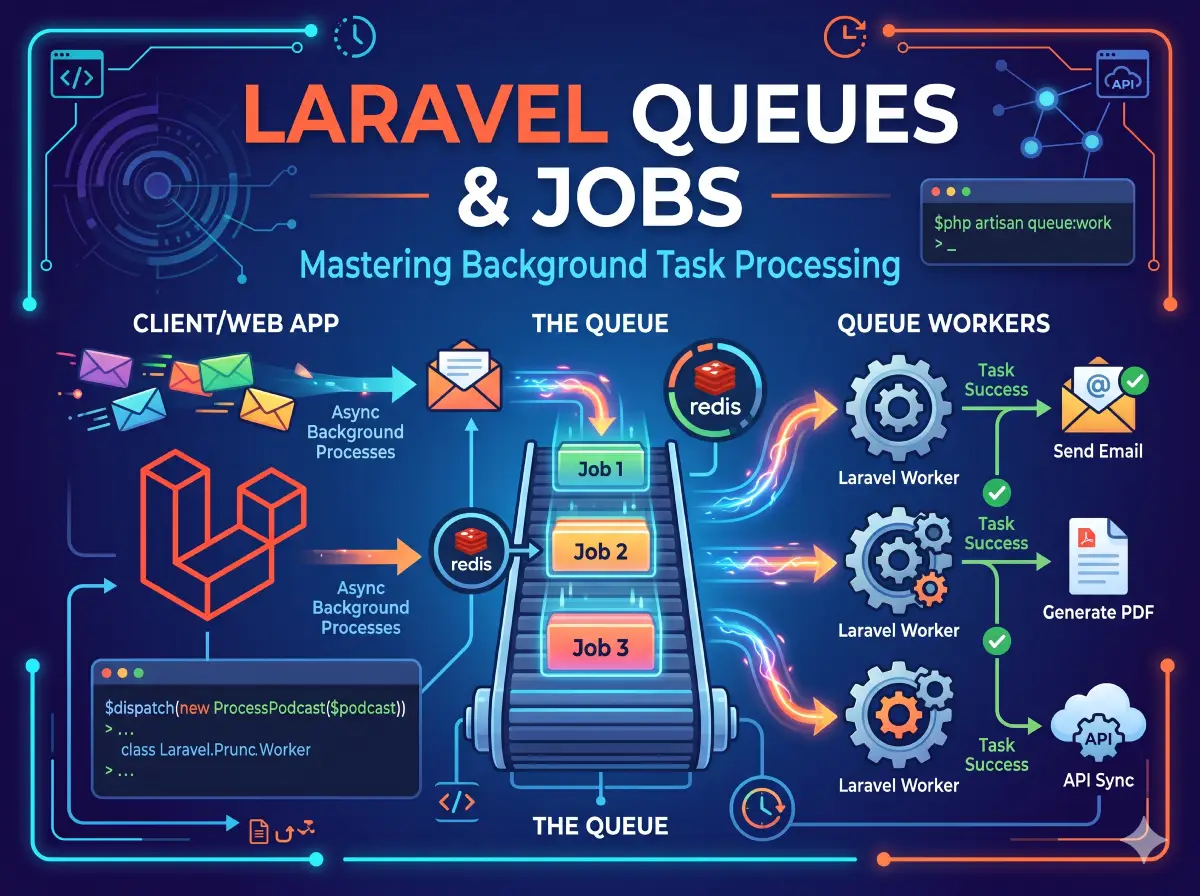
A queue is a mechanism for storing tasks that need to be processed later. Instead of executing every operation immediately, your application places a task into a queue. A separate process called a queue worker retrieves that task and executes it.
A simplified Laravel queue workflow looks like this:
- A user sends an HTTP request.
- Your Laravel application performs the immediate work required for the response.
- A background task is dispatched as a job.
- The job is placed into a queue.
- A queue worker retrieves the job.
- The worker executes the job’s
handle()method. - If the job succeeds, it is removed from the queue.
- If the job fails, Laravel can retry it or record it as a failed job.
For example, imagine a customer uploads a CSV file containing 100,000 products. Processing the entire CSV file during the upload request could take several seconds or even minutes.
Instead, the controller can dispatch a job:
ProcessProductImport::dispatch($filePath);The HTTP response can then be returned quickly while the queue worker processes the import in the background.
Why Use Laravel Queues?
Laravel queues are useful whenever a task does not need to be completed before the current HTTP request finishes.
Common Use Cases
- Sending email notifications
- Sending SMS notifications
- Processing uploaded CSV files
- Generating PDF reports
- Image resizing and optimization
- Video processing
- Importing or exporting large datasets
- Calling external APIs
- Synchronizing products with external services
- Generating invoices
- Processing payment-related background tasks
- Cleaning temporary files
- Sending webhook requests
- Search index updates
- Large database operations
Example Without a Queue
public function register(Request $request)
{
    $user = User::create([
        'name' => $request->name,
        'email' => $request->email,
        'password' => Hash::make($request->password),
    ]);

    Mail::to($user->email)->send(new WelcomeEmail($user));

    return response()->json([
        'message' => 'Registration successful',
    ]);
}
If the email provider is slow, the registration request must wait for the email operation to finish.
Example With a Queue
public function register(Request $request)
{
    $user = User::create([
        'name' => $request->name,
        'email' => $request->email,
        'password' => Hash::make($request->password),
    ]);

    SendWelcomeEmail::dispatch($user);

    return response()->json([
        'message' => 'Registration successful',
    ]);
}
Now the email operation can be processed asynchronously by a queue worker.
Laravel Jobs vs Laravel Queues
Although the terms job and queue are often used together, they are not the same thing.
| Concept | Meaning |
|---|---|
| Job | A class representing work that needs to be performed. |
| Queue | A storage mechanism where pending jobs wait for processing. |
| Queue Driver | The technology used to store and retrieve queued jobs. |
| Queue Worker | A long-running process that retrieves and executes jobs. |
| Connection | A configured connection to a queue backend. |
For example, SendInvoiceEmail may be your job, Redis may be your queue backend, and a Laravel queue worker may execute the job.
Laravel Queue Connections and Queues
One of the most important concepts when learning Laravel queues is understanding the difference between a queue connection and an individual queue.
A connection represents the backend configuration, such as Redis or Amazon SQS. A single connection can have multiple queues.
For example, you could have:
- redis connection
- high queue
- default queue
- low queue
This allows you to separate different types of work.
For example:
SendPaymentConfirmation::dispatch($payment)
    ->onQueue('high');

GenerateMonthlyReport::dispatch($report)
    ->onQueue('low');
A worker can then prioritize the high-priority queue:
php artisan queue:work --queue=high,default,lowLaravel processes the queues in the order specified, allowing high-priority work to be processed before lower-priority work.
Laravel Queue Drivers
Laravel supports multiple queue backends. The most appropriate driver depends on the application’s infrastructure and workload.
| Driver | Typical Use | Advantages |
|---|---|---|
| Database | Small to medium applications | Easy to configure when a database already exists |
| Redis | High-performance applications | Fast and suitable for large queue workloads |
| Amazon SQS | Cloud applications | Highly scalable managed queue service |
| Beanstalkd | Dedicated queue infrastructure | Simple and efficient queue backend |
| Sync | Development/testing | Executes jobs immediately |
| Null | Special cases | Discards jobs |
Laravel’s queue configuration is stored in config/queue.php.
Laravel Database Queue
The database queue driver stores queued jobs in a database table.
If your application does not already have the required queue migration, Laravel provides:
php artisan make:queue-table
php artisan migrate
You can then configure the queue connection to use the database driver.
The database driver is convenient because it does not require a separate queue server. However, for high-volume applications, Redis or a managed queue service may be a better choice.
Laravel Redis Queue
Redis is one of the most popular queue backends for Laravel applications.
Redis provides fast in-memory data operations and is particularly useful when your application processes a large number of background Laravel jobs.
Your queue configuration can use a Redis connection:
'redis' => [
    'driver' => 'redis',
    'connection' => env('REDIS_QUEUE_CONNECTION', 'default'),
    'queue' => env('REDIS_QUEUE', 'default'),
    'retry_after' => 90,
    'block_for' => null,
],
Laravel also provides Laravel Horizon for monitoring and managing Redis-powered queues.
Creating a Laravel Job
Laravel provides an Artisan command for generating jobs:
php artisan make:job ProcessOrderLaravel normally places generated jobs in the app/Jobs directory.
A typical job looks like this:
<?php

namespace App\Jobs;

use Illuminate\Contracts\Queue\ShouldQueue;
use Illuminate\Foundation\Queue\Queueable;

class ProcessOrder implements ShouldQueue
{
    use Queueable;

    public function __construct(
        public int $orderId
    ) {
    }

    public function handle(): void
    {
        // Process the order.
    }
}
The important part is implementing ShouldQueue. This tells Laravel that the job should be processed through the queue system.
Understanding the Laravel Job Class
A job normally contains two important parts: its constructor and its handle() method.
The Constructor
The constructor receives the data required by the job.
public function __construct(
    public int $orderId
) {
}
The job can then access $this->orderId when it executes.
The handle Method
The handle() method contains the actual background work.
public function handle(OrderService $service): void
{
    $service->process($this->orderId);
}
Laravel’s service container can resolve dependencies injected into the handle() method.
This is useful because the job itself can remain focused on orchestration while business logic stays inside dedicated services.
Dispatching Laravel Jobs
Once a job has been created, it can be dispatched using the job’s dispatch() method.
ProcessOrder::dispatch($orderId);Laravel places the job on the configured queue.
You can also use the global dispatch() helper:
dispatch(new ProcessOrder($orderId));The static ::dispatch() syntax is generally convenient and readable.
Dispatching Jobs to a Specific Queue
You can assign a job to a specific queue using onQueue().
ProcessOrder::dispatch($orderId)
    ->onQueue('orders');
This is useful when different jobs have different priorities or operational requirements.
For example:
SendOtp::dispatch($userId)->onQueue('high');

GenerateReport::dispatch($reportId)->onQueue('reports');

CleanupFiles::dispatch()->onQueue('low');
Dispatching Jobs to a Specific Connection
You can also specify the queue connection:
ProcessOrder::dispatch($orderId)
    ->onConnection('redis');
You can combine connection and queue:
ProcessOrder::dispatch($orderId)
    ->onConnection('redis')
    ->onQueue('orders');
Delayed Laravel Jobs
Sometimes you don’t want a job to execute immediately.
Laravel allows jobs to be delayed.
SendReminder::dispatch($userId)
    ->delay(now()->addMinutes(10));
This can be useful for:
- Payment reminders
- Subscription notifications
- Follow-up emails
- Delayed cleanup tasks
- Temporary verification processes
Synchronous Job Dispatching
Not every job needs to be processed asynchronously.
Laravel supports synchronous execution when required.
ProcessOrder::dispatchSync($orderId);With synchronous dispatching, the job is executed during the current process instead of being placed into a background queue.
This can be useful for operations that need immediate completion or for certain testing scenarios.
Deferred Job Processing
Laravel also provides deferred processing options that can execute work after the HTTP response has been sent.
For example:
RecordDelivery::dispatch($order)
    ->onConnection('deferred');
This allows work to be deferred without requiring a traditional external queue worker for that particular use case.
Laravel Jobs and Database Transactions
Database transactions require special consideration when dispatching jobs.
Imagine that you create an order inside a database transaction and immediately dispatch a job:
DB::transaction(function () use ($order) {
    $order->save();

    ProcessOrder::dispatch($order->id);
});
The queue worker could potentially process the job before the transaction has committed.
If the job attempts to read data that has not yet been committed, unexpected behavior may occur.
Laravel provides configuration and dispatching options to ensure jobs are dispatched after database transactions commit.
This is particularly important for jobs that depend on newly created or updated database records.
Laravel Job Chaining
Sometimes multiple jobs must execute in a specific order.
For example:
- Process an uploaded video.
- Generate thumbnails.
- Publish the video.
Laravel supports job chaining for these scenarios.
use Illuminate\Support\Facades\Bus;

Bus::chain([
    new ProcessVideo($videoId),
    new GenerateThumbnails($videoId),
    new PublishVideo($videoId),
])->dispatch();
The jobs execute sequentially.
If a job in the chain fails, subsequent jobs are not executed unless the chain is configured to handle the situation differently.
Laravel Job Batching
Job batching is useful when many jobs need to be processed as a group.
Imagine importing 100,000 products. Instead of creating one huge job, you can divide the work into many smaller jobs.
For example:
Bus::batch([
    new ImportProductsChunk($chunk1),
    new ImportProductsChunk($chunk2),
    new ImportProductsChunk($chunk3),
])->dispatch();
Laravel can track the batch’s progress and execute callbacks when the batch finishes.
Before using job batching, Laravel requires the appropriate batch metadata table.
php artisan make:queue-batches-table
php artisan migrate
Why Use Batches?
- Process large datasets in smaller units
- Track overall progress
- Run multiple jobs in parallel
- Handle batch completion
- Handle batch failure
- Cancel a batch when necessary
Laravel Queue Job Middleware
Laravel jobs can use middleware to control how jobs are processed.
Job middleware can be useful for:
- Rate limiting
- Preventing overlapping jobs
- Throttling exceptions
- Skipping jobs
- Applying common processing rules
Rate Limiting Laravel Jobs
Suppose your job calls an external API that permits only a limited number of requests per minute.
Without rate limiting, multiple workers could overwhelm the API.
Laravel job middleware can be used to limit job execution.
This is particularly useful for third-party APIs, payment services, email providers, and other external systems with usage limits.
Preventing Overlapping Jobs
Some jobs should not execute concurrently for the same resource.
For example, suppose you have a job that updates a customer’s account balance.
If two instances of the same job execute simultaneously, they could produce inconsistent results.
Laravel provides middleware for preventing overlapping jobs.
The basic idea is to create a lock based on a unique identifier, such as the customer’s ID.
public function middleware(): array
{
    return [
        new WithoutOverlapping($this->customerId),
    ];
}
This ensures that jobs using the same overlap key are not processed concurrently.
Throttling Exceptions
Third-party services can sometimes fail repeatedly.
Immediately retrying a job after every exception may make the situation worse.
Laravel provides queue middleware for throttling exceptions.
This allows applications to slow down retries when a service is repeatedly failing.
This is especially useful for external API integrations.
Skipping Jobs
Sometimes a queued job becomes unnecessary before it starts processing.
For example, suppose a user deletes an account after an email job has already been queued.
The queued job may no longer have any useful work to perform.
Laravel provides mechanisms that allow jobs to be skipped based on application conditions.
Laravel Job Attempts
Queue jobs can be attempted more than once.
A job attempt may be consumed because of an exception, timeout, manual release, middleware behavior, or successful execution.
By default, Laravel jobs are configured to have limited attempts rather than retrying forever.
You can configure the maximum attempts on a job.
public $tries = 3;This tells Laravel that the job may be attempted up to three times.
Retrying Failed Jobs
Temporary failures are common in distributed applications.
For example:
- An external API may be temporarily unavailable.
- A database connection may fail temporarily.
- A network request may time out.
- A third-party service may return a temporary error.
Retrying the job can allow the operation to succeed later.
You can control retry behavior using job properties and methods.
Backoff
Instead of retrying immediately, you can introduce a delay between attempts.
public $backoff = 10;You can also use more advanced backoff strategies depending on the job’s requirements.
For API-heavy applications, exponential backoff is often preferable because it reduces pressure on an already failing service.
Laravel Job Timeout
Long-running jobs should not be allowed to execute indefinitely.
You can specify a timeout:
public $timeout = 120;This limits the amount of time the job is allowed to execute.
Timeout configuration is particularly important for jobs that perform:
- External HTTP requests
- Large file processing
- Image manipulation
- Video processing
- Large database operations
Failing a Job on Timeout
Laravel can be configured to mark a job as failed when it times out.
public $failOnTimeout = true;This is useful when retrying a timed-out operation would be unsafe or undesirable.
Laravel Failed Jobs
Even well-designed applications experience failed jobs.
Laravel provides a failed-job system that allows failed jobs to be recorded for later inspection and retry.
A failed job may occur because of:
- An unhandled exception
- A timeout
- An unavailable external service
- Invalid data
- Database errors
- Unexpected application errors
Creating the Failed Jobs Table
Laravel applications can store failed job information in a database.
The failed jobs migration can be generated using Laravel’s Artisan tooling when necessary.
Once configured, failed jobs can be inspected and retried using Artisan commands.
Retrying Failed Laravel Jobs
Laravel provides commands for working with failed jobs.
A failed job can be retried after the underlying problem has been fixed.
php artisan queue:retry allYou can also retry specific failed jobs when required.
Pruning Failed Jobs
Failed-job records should not be allowed to grow indefinitely.
Laravel provides:
php artisan queue:prune-failedYou can specify how long failed records should be retained using the available command options.
Production applications should establish an appropriate retention policy for failed jobs.
The Laravel Queue Worker
A queue worker is responsible for retrieving jobs from the queue and executing them.
The basic command is:
php artisan queue:workThe worker continues running and processes queued jobs as they become available.
Using a Specific Queue Connection
php artisan queue:work redisUsing a Specific Queue
php artisan queue:work redis --queue=emailsProcessing Multiple Queues
php artisan queue:work --queue=high,defaultThe queue order can be used to establish processing priority.
queue:work vs queue:listen
Laravel provides both queue:work and queue:listen.
queue:work uses a long-running worker and is generally more efficient for production workloads.
queue:listen reloads the application for each job, which can be convenient during development but is less efficient.
For production environments, queue:work is generally preferred.
Running One Laravel Queue Job
For debugging or certain controlled environments, you can process one job:
php artisan queue:work --onceAfter processing one job, the worker exits.
Limiting the Number of Jobs
You can instruct a worker to process a certain number of jobs and then exit:
php artisan queue:work --max-jobs=1000This can be useful with process managers because the worker can periodically restart and release memory accumulated during long-running execution.
Stopping a Worker When the Queue Is Empty
Laravel also supports:
php artisan queue:work --stop-when-emptyThis is particularly useful for temporary worker environments and certain container-based workloads.
Queue Worker Memory Management
Laravel queue workers are long-running processes.
Unlike a normal HTTP request, the PHP process does not terminate after every job.
This means application code should be designed carefully to avoid unnecessary memory growth.
Large arrays, file contents, static variables, and objects retained in memory can cause long-running workers to consume increasing amounts of memory.
Laravel provides worker options such as maximum jobs and maximum execution time to help manage worker lifecycles.
Restarting Laravel Queue Workers During Deployment
One important production detail is that queue workers are long-lived processes.
If you deploy new PHP code while workers are already running, existing workers may continue using the old application code.
Laravel provides:
php artisan queue:restartThis signals queue workers to gracefully stop after completing their current job.
A process manager should then start them again using the newly deployed code.
This makes queue worker restarts an important part of production deployment.
Laravel Queue Worker Timeout and retry_after
Two configuration concepts are particularly important when working with queue timeouts:
- –timeout
- retry_after
These settings work together.
The worker timeout should generally be several seconds shorter than the queue connection’s retry_after value. This helps prevent the same job from becoming available for another worker while the original worker is still processing it.
Incorrect timeout configuration can result in duplicate job processing.
Laravel Queue Priorities
Not every job has the same importance.
For example, an application may have:
| Queue | Example Jobs | Priority |
|---|---|---|
| high | Payment confirmation, OTP, critical notifications | High |
| default | Normal application tasks | Medium |
| low | Reports, cleanup, analytics | Low |
You can run:
php artisan queue:work --queue=high,default,lowThis allows high-priority work to be processed before lower-priority jobs.
Laravel Queue Supervisor Configuration
In production, simply running php artisan queue:work manually is not sufficient.
If the worker crashes or the server restarts, the worker needs to be started again.
A process manager such as Supervisor can monitor Laravel queue workers and restart them when necessary.
A typical production setup involves:
- Laravel application deployed on the server.
- Redis or another queue backend configured.
- Laravel queue worker running continuously.
- Supervisor monitoring the worker.
- Deployment process running queue:restart.
Laravel Horizon
Laravel Horizon provides a dashboard and configuration system for Redis-powered Laravel queues.
Horizon can make queue management much easier because it provides visibility into queue activity and worker performance.
It is especially useful for applications with substantial Redis queue workloads.
For a small application, a basic worker may be sufficient. For a production application with multiple queues and significant background processing, Horizon can provide much better operational visibility.
Unique Laravel Jobs
Sometimes you do not want the same job to be queued multiple times.
For example, suppose a user repeatedly clicks a button that dispatches a synchronization job.
Without protection, the application may place multiple identical synchronization jobs into the queue.
Laravel supports unique jobs that allow developers to prevent duplicate queued jobs based on uniqueness rules.
This can be particularly useful for:
- Data synchronization
- External API synchronization
- Report generation
- Resource indexing
- Duplicate notification prevention
Encrypted Laravel Jobs
Some jobs may contain sensitive information.
Laravel provides support for encrypted queued jobs.
This can be useful when the serialized job payload contains information that should not be stored in plaintext by the queue backend.
When designing jobs, however, it is still a good practice to pass identifiers instead of large or sensitive data structures whenever possible.
Passing Eloquent Models to Jobs
Laravel’s queue system supports serializing Eloquent models in queued jobs.
For example:
class ProcessOrder implements ShouldQueue
{
    use Queueable;

    public function __construct(
        public Order $order
    ) {
    }

    public function handle(): void
    {
        // Process the order.
    }
}
Laravel uses its queue serialization mechanisms to represent the model when the job is stored.
When the job is processed, Laravel can restore the model from the database.
However, developers should be careful about relying on the model’s state because the database record may have changed between dispatch and execution.
For many jobs, passing a model ID and explicitly retrieving the current record can make the intended behavior clearer.
Ignoring Missing Models
Consider a job containing a model that is later deleted.
When the worker attempts to restore the model, it may no longer exist.
Laravel provides options for handling missing models without causing unnecessary job failures.
This is useful for jobs where the absence of the model means there is simply nothing left to process.
Queueing Closures
Laravel also supports queueing closures.
This can be convenient for small pieces of background work.
However, dedicated job classes are generally easier to maintain as the application grows because they provide a clear structure for testing, retry behavior, middleware, dependencies, and business logic.
Laravel Queue Failover
Production systems should consider what happens when a queue backend becomes unavailable.
Laravel provides queue failover capabilities that allow applications to define alternative behavior when the preferred queue connection cannot be used.
This can improve resilience for applications where background processing is business-critical.
Amazon SQS and Laravel Queues
Amazon Simple Queue Service is a managed cloud queue service that can be used by Laravel applications.
SQS is particularly useful for applications that need scalable queue infrastructure without maintaining their own queue servers.
Laravel provides integration with SQS through its queue configuration.
SQS is often a strong choice for cloud-native Laravel applications, especially when infrastructure is already hosted on AWS.
SQS FIFO Queues
Laravel supports Amazon SQS FIFO queues.
FIFO means First In, First Out.
FIFO queues can be useful when message ordering matters.
Laravel supports message group IDs for SQS FIFO processing.
Jobs belonging to the same group can be processed sequentially while different groups can be processed concurrently.
This can be useful for operations such as processing events belonging to the same customer or account where order matters.
Testing Laravel Jobs
Queue-based applications should be tested carefully.
You generally do not want automated tests to actually send emails, call external APIs, or wait for real queue workers.
Laravel provides queue faking functionality.
For example:
Queue::fake();

ProcessOrder::dispatch($orderId);

Queue::assertPushed(ProcessOrder::class);
This allows you to verify that the job was dispatched without actually processing it.
Testing Specific Jobs
You can test whether a particular job was dispatched with the expected data.
Queue::assertPushed(ProcessOrder::class, function ($job) use ($orderId) {
    return $job->orderId === $orderId;
});
This is useful for testing controllers, services, events, and other application components that dispatch jobs.
Testing Job Chains
Laravel provides testing support for job chains.
This allows developers to verify that jobs were chained in the expected order.
For applications with multi-step workflows, testing the chain is important because an incorrectly ordered job can cause downstream processing problems.
Testing Job Batches
Job batches can also be tested using Laravel’s queue testing functionality.
This allows developers to verify that a batch contains the expected jobs and that the application’s batch callbacks behave correctly.
Laravel Queue Events
Laravel provides queue events that can be used to respond to queue lifecycle events.
These events can be useful for:
- Logging
- Monitoring
- Performance measurement
- Alerting
- Operational dashboards
For example, an application can monitor how long jobs take to process and identify unusually slow jobs.
Monitoring Laravel Queues
Queue monitoring is essential in production.
A queue can appear healthy while thousands of jobs are waiting behind a slow worker.
Useful metrics include:
- Number of pending jobs
- Job processing time
- Failed job count
- Retry count
- Worker availability
- Queue latency
- Memory usage
Laravel Horizon is particularly useful for Redis-based queues because it provides visibility into queue workers and job activity.
Best Practices for Laravel Queues
1. Keep Jobs Small
A queue job should ideally represent one meaningful unit of work.
Instead of creating one enormous job that imports an entire database, divide the operation into smaller jobs when appropriate.
2. Avoid Large Payloads
Do not unnecessarily place huge arrays, files, or objects into job payloads.
Prefer passing IDs or lightweight identifiers and loading the required data during job execution.
3. Make Jobs Idempotent
An idempotent job can safely be executed more than once without producing incorrect results.
This is extremely important because distributed queue systems can encounter retries, timeouts, worker crashes, and duplicate processing scenarios.
For example, instead of blindly inserting a payment record, a job could check whether the transaction has already been processed.
4. Configure Timeouts Carefully
Set realistic timeouts for different jobs.
A quick notification job should not have the same timeout as a large file-processing job.
5. Use Appropriate Retry Strategies
Do not retry every failure indefinitely.
Temporary network failures may be retryable, while validation errors or invalid data may require immediate failure.
6. Separate Queue Priorities
Use different queues for different workloads when necessary.
Critical operations should not be forced to wait behind large background imports.
7. Monitor Failed Jobs
A production application should have a process for reviewing failed jobs and determining whether they should be retried, fixed, or permanently discarded.
8. Restart Workers During Deployment
Always account for long-running queue workers during deployment.
Use Laravel’s queue restart mechanism and a process manager to ensure workers load the latest application code.
Common Laravel Queue Mistakes
Running Slow Tasks Inside Controllers
One of the most common mistakes is performing heavy processing directly inside an HTTP request.
If the operation does not need to finish before the response, consider moving it to a queue job.
Forgetting to Run a Queue Worker
Dispatching a job does not automatically mean that it will be processed.
If your application uses an asynchronous queue connection, a queue worker must be running.
php artisan queue:workUsing the Wrong Queue Connection
Always verify the queue connection configured in the application’s environment and config/queue.php.
Ignoring Failed Jobs
A queue that contains thousands of failed jobs can indicate serious application or infrastructure problems.
Monitor failures and investigate the underlying cause rather than simply retrying everything.
Incorrect Timeout Configuration
If worker timeout and queue retry settings are configured incorrectly, the same job can potentially be processed by multiple workers.
Careful timeout and retry configuration is essential for production systems.
Example: Laravel Order Processing Job
Let’s create a practical example for an e-commerce application.
Suppose an order has been created and you want to perform the following operations:
- Generate an invoice.
- Send an email.
- Synchronize the order with an external API.
Instead of performing everything in the controller, create a job:
php artisan make:job ProcessOrderThe job could look like:
<?php

namespace App\Jobs;

use App\Models\Order;
use App\Services\OrderService;
use Illuminate\Contracts\Queue\ShouldQueue;
use Illuminate\Foundation\Queue\Queueable;

class ProcessOrder implements ShouldQueue
{
    use Queueable;

    public function __construct(
        public int $orderId
    ) {
    }

    public function handle(OrderService $service): void
    {
        $order = Order::find($this->orderId);

        if (! $order) {
            return;
        }

        $service->process($order);
    }
}
Dispatch it after the order has been created:
ProcessOrder::dispatch($order->id);Now the request does not need to perform every expensive operation synchronously.
Example: Processing a Large CSV Import
Large imports are an excellent use case for Laravel queues.
Instead of processing a 100,000-row CSV in one request, divide the data into smaller chunks.
For example:
ImportProductsChunk::dispatch($chunkId)
    ->onQueue('imports');
Multiple workers can process independent chunks concurrently, depending on your application architecture and data consistency requirements.
This approach can significantly improve reliability compared with one extremely large request.
Laravel Queues in Production Architecture
A typical production Laravel queue architecture may look like this:
User
  |
  v
Laravel Application
  |
  +---- HTTP Response
  |
  +---- Queue Job
           |
           v
      Redis / SQS
           |
           v
      Queue Worker
           |
           v
      Job Processing
           |
           +---- Database
           +---- External API
           +---- Email Service
The web application handles user requests while dedicated workers handle background processing.
This separation allows the application to scale more effectively.
Laravel Queues and Horizontal Scaling
One major advantage of queue-based architecture is that queue workers can be scaled independently from web servers.
For example, if your application receives a large number of background jobs, you can run additional queue workers without necessarily increasing the number of web servers.
A larger application might use:
| Component | Purpose |
|---|---|
| Web Server | Handles HTTP requests |
| Application Server | Runs Laravel application code |
| Redis/SQS | Stores queued jobs |
| Queue Workers | Process background jobs |
| Supervisor/Horizon | Manages and monitors workers |
| Database | Stores application data |
When Should You Use Laravel Queues?
A useful rule is to consider queues whenever an operation is:
- Slow
- Independent of the HTTP response
- Retryable
- Resource-intensive
- External-service dependent
- Performed repeatedly at scale
However, not every operation belongs in a queue.
If a user needs the result immediately, asynchronous processing may not be appropriate unless you provide a separate status or polling mechanism.
Laravel Queues vs Laravel Task Scheduling
Queues and task scheduling solve different problems.
| Feature | Queues | Task Scheduling |
|---|---|---|
| Primary purpose | Process background jobs | Run commands/tasks at scheduled times |
| Example | Send email | Run cleanup every night |
| Trigger | Job dispatch | Time-based schedule |
| Worker | Queue worker | Scheduler/cron mechanism |
They can also be combined.
For example, a scheduled command could identify expired subscriptions and dispatch a queue job for each subscription.
Laravel Queues and Events
Laravel events and queues can work together effectively.
For example:
OrderCreated::dispatch($order);A listener can then perform background processing.
Depending on the application design, listeners can themselves be queued.
This allows an application to maintain a clean separation between the event that occurred and the background work triggered by that event.
Security Considerations for Laravel Jobs
Queue jobs should be treated as application data and should not blindly trust their input.
Important considerations include:
- Validate identifiers before processing.
- Do not store unnecessary sensitive information in job payloads.
- Use encrypted jobs when appropriate.
- Protect external API credentials.
- Use authorization checks when a job performs privileged operations.
- Log failures without exposing secrets.
Performance Optimization for Laravel Queues
Queue performance depends on more than simply increasing the number of workers.
Consider the following:
- Use Redis or a managed queue service for high workloads.
- Keep job payloads small.
- Optimize database queries.
- Avoid N+1 queries inside jobs.
- Use appropriate queue priorities.
- Split large workloads into smaller jobs.
- Use batching when appropriate.
- Monitor queue latency.
- Configure worker timeouts correctly.
- Restart workers during deployment.
Laravel Queues Checklist for Production
Before deploying Laravel queues to production, verify the following:
- Queue connection is configured correctly.
- Queue backend is available.
- Required database migrations exist.
- Queue workers are running.
- Workers are supervised.
- Failed jobs are being recorded.
- Failed jobs are monitored.
- Retry settings are appropriate.
- Timeout settings are appropriate.
- Worker memory limits are configured.
- Workers are restarted during deployments.
- Queue priorities are defined where necessary.
- Long-running jobs are optimized.
- External API failures are handled gracefully.
Frequently Asked Questions About Laravel Queues
What are Laravel queues?
Laravel queues allow applications to defer time-consuming tasks and process them in the background using queue workers. They are commonly used for emails, notifications, imports, reports, API calls, and other long-running operations.
What is a Laravel job?
A Laravel job is a PHP class that represents a unit of work. A queue worker executes the job, normally through its handle() method.
How do I create a Laravel job?
Use the Artisan command:
php artisan make:job ProcessOrderThen implement the required logic inside the generated job class.
How do I dispatch a Laravel job?
You can dispatch a job using its static dispatch() method:
ProcessOrder::dispatch($orderId);How do I run Laravel queue workers?
Run:
php artisan queue:workFor production, use a process manager such as Supervisor or a suitable container/process orchestration solution.
Which queue driver should I use in Laravel?
For simple applications, the database driver can be convenient. Redis is commonly used for high-performance applications, while Amazon SQS is useful for cloud-based and highly scalable systems.
What is Laravel Horizon?
Laravel Horizon is a dashboard and configuration system for Redis-powered Laravel queues. It provides visibility and operational controls for Redis queue workers.
How do I retry failed Laravel jobs?
Laravel provides Artisan commands for retrying failed jobs, including:
php artisan queue:retry allYou can also retry specific failed jobs when needed.
How do I delay a Laravel job?
Use the delay() method:
SendReminder::dispatch($userId)
    ->delay(now()->addMinutes(10));
Can Laravel jobs be retried automatically?
Yes. Laravel supports configurable job attempts, backoff behavior, timeout handling, and failed-job processing.
What is the difference between queue and job in Laravel?
A job represents the work that needs to be performed, while a queue is the system where pending jobs wait until a worker processes them.
Can Laravel process multiple jobs simultaneously?
Yes. You can run multiple queue worker processes. Each worker can process jobs independently, allowing background workloads to run concurrently.
How do I prioritize Laravel jobs?
Use separate queues such as high, default, and low, then run a worker with a priority order:
php artisan queue:work --queue=high,default,lowWhy are my Laravel jobs not running?
Common causes include a stopped queue worker, incorrect queue connection configuration, unavailable Redis/database infrastructure, an incorrect queue name, or deployment-related worker issues.
Should I pass an Eloquent model or model ID to a job?
Both approaches are supported, but passing an ID can make the job’s behavior more explicit and allows the worker to retrieve the latest database state when processing the job.
How should Laravel queue workers be handled during deployment?
Because queue workers are long-running processes, they should be gracefully restarted during deployment using Laravel’s queue restart mechanism and then automatically restarted by a process manager.
Laravel Queues Quick Reference
| Task | Command / Code |
|---|---|
| Create a job | php artisan make:job ProcessOrder |
| Dispatch a job | ProcessOrder::dispatch($id); |
| Dispatch to a queue | ProcessOrder::dispatch($id)->onQueue(‘high’); |
| Delay a job | ->delay(now()->addMinutes(10)) |
| Run worker | php artisan queue:work |
| Run Redis worker | php artisan queue:work redis |
| Process selected queues | php artisan queue:work –queue=high,default |
| Process one job | php artisan queue:work –once |
| Restart workers | php artisan queue:restart |
| Create database queue table | php artisan make:queue-table |
| Create batch table | php artisan make:queue-batches-table |
| Retry failed jobs | php artisan queue:retry all |
| Prune failed jobs | php artisan queue:prune-failed |
References:
Conclusion
Laravel queues are one of the most important features for building responsive and scalable Laravel applications. They allow developers to move slow or resource-intensive operations away from the HTTP request and into background workers.
Understanding Laravel jobs, queue connections, queue drivers, workers, retries, failed jobs, delays, job chaining, batching, middleware, priorities, and production worker management gives developers the foundation needed to build reliable background processing systems.
For small applications, the database queue driver may be enough to get started. As an application grows, Redis, Laravel Horizon, Amazon SQS, multiple workers, queue priorities, and monitoring can provide a more robust architecture.
The most important principle is to design Laravel queue jobs as small, reliable, retryable, and preferably idempotent units of work. Avoid putting unnecessary data into job payloads, configure timeout and retry settings carefully, monitor failures, and make queue workers part of your deployment and infrastructure strategy.
Once these concepts are understood, Laravel queues become much more than a way to send emails in the background. They can form the foundation of scalable application workflows, asynchronous integrations, large data processing systems, notifications, reports, synchronization processes, and other background operations.