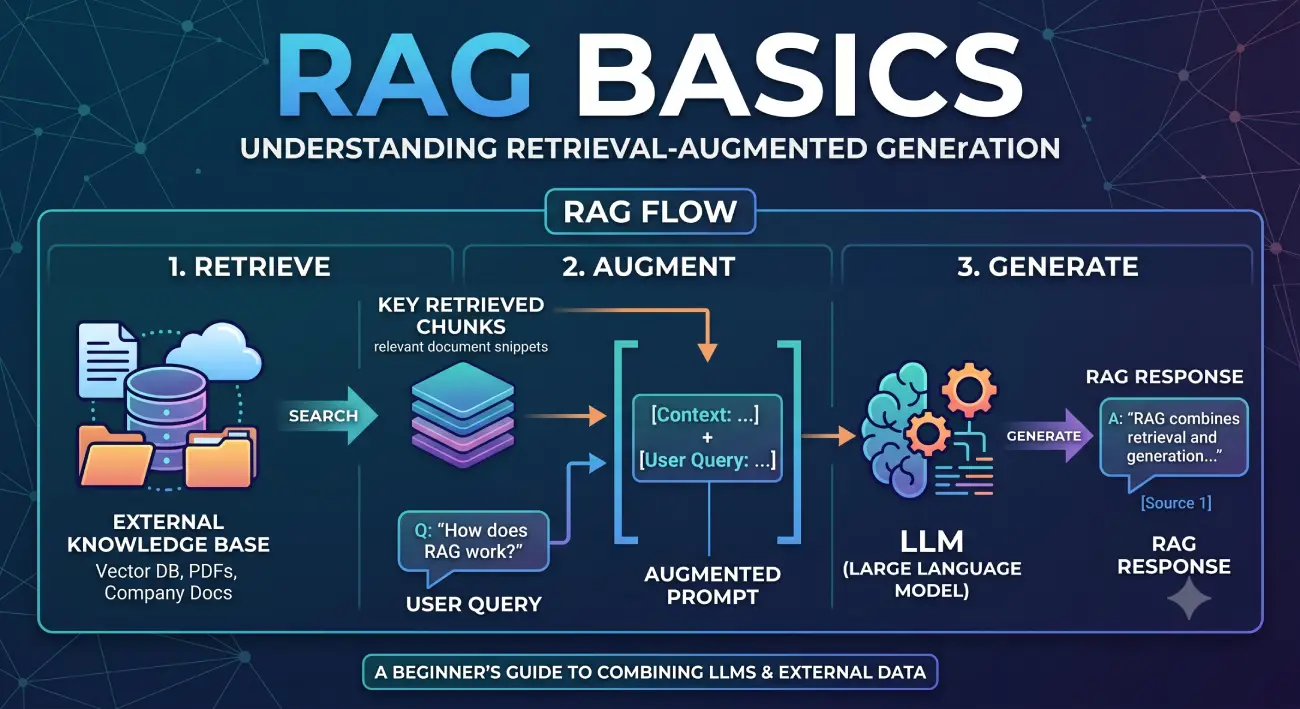
This guide explains RAG Basics from beginner to professional level, covering architecture, workflow, benefits, hands-on examples, real-world applications, and advanced Retrieval Augmented Generation architectures used in 2026.
Table of Contents
Large Language Models (LLMs) have revolutionized software development, content generation, customer support, and enterprise automation. However, despite their impressive capabilities, they have one major limitation: they only know what they were trained on and cannot automatically access your company’s latest documents, private databases, or real-time information.
For example:
- A telecom company wants an AI chatbot to answer questions from internal technical documentation.
- A hospital wants doctors to query medical protocols securely.
- A law firm wants AI to search legal documents before answering.
- A software company wants AI to answer questions from product manuals and release notes.
Training or fine-tuning an LLM every time documents change is expensive, time-consuming, and often impractical.
This is where Retrieval Augmented Generation (RAG) becomes one of the most important concepts in modern AI.
RAG combines the reasoning ability of Large Language Models with external knowledge retrieval, allowing AI systems to generate responses based on trusted and up-to-date information rather than relying solely on model memory.
Today, Retrieval Augmented Generation is used by enterprises, startups, research organizations, healthcare providers, banks, telecom operators, and software companies to build intelligent AI assistants.
What is RAG?
Retrieval Augmented Generation (RAG) is an AI architecture that enhances Large Language Models by retrieving relevant information from external knowledge sources before generating a response.
Instead of depending only on the model’s internal parameters, Retrieval Augmented Generation allows the AI to search:
- PDFs
- Documents
- Internal company knowledge
- Databases
- APIs
- Wikis
- Emails
- Product manuals
- Research papers
- CRM systems
- Cloud storage
- Enterprise knowledge bases
The retrieved information is then supplied to the LLM as additional context.
The workflow looks like this:
User Question
       │
       ▼
Query Processing
       │
       ▼
Embedding Generation
       │
       ▼
Vector Database Search
       │
       ▼
Relevant Documents Retrieved
       │
       ▼
Prompt Construction
       │
       ▼
Large Language Model
       │
       ▼
Generated Answer
Instead of guessing, the model answers using retrieved evidence.
Example:
Without RAG
User:
What is our company’s latest refund policy?
LLM:
I don’t know.
or
(Hallucinates an incorrect answer)
With RAG:
User:
What is our latest refund policy?
Retriever:
- Searches internal documentation
- Retrieves latest policy
LLM:
Based on the latest policy document updated on March 2026…
Result:
- Accurate
- Up-to-date
- Explainable
- Trustworthy
Why Do We Need RAG?
Traditional LLMs suffer from several limitations:
1. Knowledge Cutoff
Models only know information available during training.
They cannot automatically know:
- Today’s news
- Latest company policies
- Internal documents
- New product releases
2. Hallucinations
Sometimes LLMs confidently generate incorrect information.
Example:
User:
What is Version 12 API endpoint?
The model may invent an answer.
RAG reduces hallucinations by providing factual context.
3. Private Data
Enterprise information should not be retrained into public models.
RAG enables secure access to:
- HR documents
- Medical records
- Banking policies
- Telecom manuals
- Engineering documents
4. Cost
Fine-tuning for every document update is expensive.
RAG updates only the knowledge base instead of retraining the model.
The Two Stages of RAG Basics
The RAG pipeline consists of two major stages.
Stage 1: Retrieval
The first stage focuses on finding relevant information.
Workflow:
Documents
      │
      ▼
Chunking
      │
      ▼
Embedding Generation
      │
      ▼
Vector Database
      │
      ▼
Similarity Search
      │
      ▼
Top Matching Chunks
Step 1: Document Collection
Sources include:
- PDFs
- Word files
- Websites
- Internal wiki
- SQL database
- APIs
- Documentation
- Product manuals
Step 2: Document Chunking
Large documents are divided into smaller chunks.
Example:
100-page PDF
↓
500 chunks
↓
Each chunk indexed separately
Smaller chunks improve retrieval accuracy.
Step 3: Embeddings
Text is converted into vectors.
Example:
"The internet is fast"

↓

[0.12, -0.88, 0.54, ...]
Embeddings capture semantic meaning rather than exact words.
Step 4: Vector Database
Embeddings are stored in specialized databases like:
- Pinecone
- ChromaDB
- Weaviate
- Milvus
- Qdrant
- FAISS
The vector database performs similarity search.
Step 5: Semantic Retrieval
When the user asks:
Why is my internet slow?
Retriever searches semantically similar chunks like:
- Network congestion
- Signal degradation
- Fiber outage
- Router troubleshooting
instead of keyword matching only.
Stage 2: Generation
Once relevant chunks are retrieved:
User Question

+

Retrieved Documents

↓

Prompt Construction

↓

LLM

↓

Final Response
Prompt example:
Question:

Why is my internet slow?

Context:

Document 1:
...

Document 2:
...

Generate answer only using provided context.
The LLM produces a grounded response instead of hallucinating.
Complete RAG Pipeline
                Documents

        PDFs
        SQL
        APIs
        Wiki
        Manuals

             │

             ▼

      Text Preprocessing

             │

             ▼

         Chunk Documents

             │

             ▼

      Generate Embeddings

             │

             ▼

        Store in Vector DB

==============================

          User Query

             │

             ▼

      Query Embedding

             │

             ▼

      Similarity Search

             │

             ▼

    Retrieve Top Documents

             │

             ▼

      Build Final Prompt

             │

             ▼

      Large Language Model

             │

             ▼

          Final Answer
Benefits of Retrieval Augmented Generation
1. Up-to-Date Information
No retraining required for every document update.
2. Lower Hallucinations
Answers are grounded in retrieved evidence.
3. Enterprise Knowledge Integration
AI can securely access:
- Internal documentation
- Customer records
- Technical manuals
- SOPs
4. Lower Training Cost
Updating documents is significantly cheaper than retraining LLMs.
5. Explainability
Responses can cite retrieved documents.
6. Better Accuracy
Relevant context improves answer quality.
7. Domain Specialization
Works well for:
- Finance
- Telecom
- Healthcare
- Manufacturing
- Education
- Government
Hands-on Example: Telecom RAG Project
Let’s understand RAG with a practical telecom support assistant.
Problem
Customers ask:
- Why is my internet slow?
- Why am I getting packet loss?
- How to restart fiber modem?
- Why is 5G unavailable?
- How to troubleshoot VoIP?
Traditional chatbot:
- Generic answers
- Hallucinations
- No company-specific knowledge
RAG chatbot:
- Reads telecom documentation
- Retrieves troubleshooting guides
- Generates accurate responses
Step 1: Data Sources
Collect:
- Router manuals
- Fiber documentation
- Internal SOPs
- Support tickets
- Knowledge base
- FAQ documents
Step 2: Chunk Documents
Example:
Manual:
Page 1

Installation

...

Page 2

Router Reset

...

Page 3

DNS Configuration

...
Converted into multiple searchable chunks.
Step 3: Create Embeddings
Every chunk becomes a vector representation.
Stored in vector database.
Step 4: User Query
Customer:
My fiber internet disconnects every evening.
Query embedding generated.
Semantic search performed.
Retrieved:
- Peak-hour congestion
- Signal degradation
- Router diagnostics
- Fiber maintenance
Step 5: Prompt Construction
Question:

My fiber disconnects every evening.

Retrieved Context:

Document A...

Document B...

Generate answer only from context.
Step 6: LLM Response
AI answers:
- Possible congestion
- Signal diagnostics
- Router reboot
- Check LOS indicator
- Contact ISP if issue persists
Grounded using retrieved documents.
Real-Life RAG Applications
Customer Support
AI assistants answer customer questions using internal documentation.
Examples:
- Telecom
- Banking
- SaaS
- Insurance
Healthcare
Doctors query:
- Medical protocols
- Drug guidelines
- Hospital SOPs
Finance
Banks retrieve:
- Compliance rules
- Risk policies
- Internal regulations
Legal
Law firms search:
- Contracts
- Regulations
- Legal precedents
Education
Students query:
- Lecture notes
- Books
- Research papers
Enterprise Search
Employees search:
- HR documents
- Internal wiki
- Engineering documentation
Manufacturing
Factories retrieve:
- Equipment manuals
- Maintenance procedures
- Safety documentation
Software Development
Developers ask:
- API documentation
- SDK guides
- Architecture documents
- Deployment instructions
Types of RAG
Modern AI systems use several RAG architectures.
1. Naive RAG
Simplest implementation.
User

↓

Retriever

↓

LLM

↓

Answer
Advantages:
- Easy
- Fast
- Beginner friendly
Disadvantages:
- Limited retrieval quality
2. Advanced RAG
Includes:
- Better chunking
- Metadata filtering
- Re-ranking
- Query expansion
Query

↓

Expansion

↓

Retriever

↓

Re-ranker

↓

LLM
Better accuracy.
3. Hybrid RAG
Combines:
- Semantic search
- Keyword search
Example:
BM25
Vector Search
↓
Combined ranking
Useful for enterprise search.
4. Multi-Stage RAG
Multiple retrieval passes.
Question

↓

Retriever 1

↓

Retriever 2

↓

Re-ranker

↓

LLM
Improves precision.
5. Graph RAG
Knowledge represented as graphs.
Example:
Customer

↓

Subscription

↓

Plan

↓

Tower

↓

Issue
Excellent for:
- Knowledge graphs
- Enterprise relationships
- Connected information
6. Agentic RAG
AI agents decide:
- Which tools to call
- Which documents to retrieve
- Whether another retrieval step is needed
Typical workflow:
User

↓

AI Agent

↓

Retrieve

↓

Reason

↓

Retrieve Again

↓

LLM

↓

Answer
Increasingly popular in enterprise AI.
7. Multimodal RAG
Retrieves:
- Images
- PDFs
- Tables
- Videos
- Charts
instead of text only.
Useful in:
- Healthcare
- Manufacturing
- Education
8. Self-Correcting RAG
The system validates:
- Retrieved context
- Generated response
- Confidence score
before producing the final answer.
Helps reduce hallucinations further.
Core Components of a RAG System
A production-ready RAG solution typically includes:
- Document Loader
- Parser
- Chunker
- Embedding Model
- Vector Database
- Retriever
- Re-ranker
- Prompt Builder
- Large Language Model
- Response Validator
- Monitoring System
- Logging
- Security Layer
Popular RAG Technologies in 2026
Frameworks
- LangChain
- LlamaIndex
- Haystack
- DSPy
Vector Databases
- Pinecone
- ChromaDB
- Weaviate
- Milvus
- Qdrant
- FAISS
Embedding Models
- OpenAI Embeddings
- BGE
- E5
- Jina Embeddings
- Voyage AI
LLMs
- GPT
- Claude
- Gemini
- Llama
- Mistral
- Qwen
Best Practices for Building RAG Systems
Use Proper Chunk Sizes
Avoid chunks that are:
- Too large
- Too small
Balanced chunks improve retrieval.
Store Metadata
Include:
- Source
- Author
- Date
- Version
- Category
Useful for filtering.
Use Re-ranking
Initial retrieval is not always optimal.
Re-ranking significantly improves answer quality.
Keep Documents Updated
Regular synchronization ensures current information.
Evaluate Retrieval
Measure:
- Recall
- Precision
- Context relevance
- Faithfulness
Monitor Hallucinations
Validate outputs before showing users.
Secure Sensitive Data
Implement:
- Authentication
- Authorization
- Encryption
- Access control
- Audit logs
Challenges of RAG
Although powerful, Retrieval Augmented Generation also presents challenges:
- Poor chunking
- Weak embeddings
- Low-quality retrieval
- Outdated documents
- Vector drift
- Prompt injection attacks
- Security risks
- Retrieval latency
- Ranking issues
- Cost optimization
Proper architecture and monitoring help address these challenges.
Future of RAG
Retrieval Augmented Generation is rapidly evolving toward:
- Agentic AI
- Autonomous workflows
- Multi-agent systems
- Graph-based retrieval
- Hybrid search
- Multimodal reasoning
- Self-improving retrieval
- Real-time enterprise intelligence
Future enterprise AI assistants will increasingly combine Retrieval Augmented Generation with planning, reasoning, tool usage, and workflow automation rather than relying solely on static retrieval pipelines.
References:
- OpenAI Documentation
https://platform.openai.com/docs - LangChain Documentation
https://docs.langchain.com/ - LlamaIndex Documentation
https://docs.llamaindex.ai/ - Haystack Documentation
https://docs.haystack.deepset.ai/ - Pinecone Documentation
https://docs.pinecone.io/ - Chroma Documentation
https://docs.trychroma.com/ - Weaviate Documentation
https://docs.weaviate.io/ - Milvus Documentation
https://milvus.io/docs - Qdrant Documentation
https://qdrant.tech/documentation/ - FAISS Documentation
https://faiss.ai/ - Retrieval-Augmented Generation for Knowledge-Intensive NLP Tasks (Lewis et al.)
https://arxiv.org/abs/2005.11401 - Dense Passage Retrieval for Open-Domain Question Answering
https://arxiv.org/abs/2004.04906
Conclusion
Retrieval Augmented Generation has become one of the foundational building blocks of enterprise AI. By combining external knowledge retrieval with the reasoning capabilities of Large Language Models, Retrieval Augmented Generation delivers more accurate, explainable, and up-to-date responses while significantly reducing hallucinations.
Whether you are building a customer support chatbot, an internal knowledge assistant, a healthcare information system, or a telecom troubleshooting platform, Retrieval Augmented Generation provides a scalable and cost-effective alternative to constantly retraining language models.
For beginners, understanding the concepts of document chunking, embeddings, vector databases, and semantic search provides a strong foundation for modern AI development. For experienced professionals, advanced techniques such as Hybrid RAG, Graph RAG, Agentic RAG, and Multimodal Retrieval Augmented Generation open the door to sophisticated enterprise-grade applications capable of handling complex reasoning and large-scale knowledge management.
As AI continues to evolve in 2026 and beyond, Retrieval Augmented Generation is expected to remain a core architectural pattern powering intelligent assistants, enterprise search platforms, autonomous agents, and domain-specific AI systems across virtually every industry.