Astro Overview (2026) – Complete Helpful Guide to the Modern Static Web Framework
AstroOct 09, 2022
In this article, we’ll see Astro Overview.
Table of Contents
In the fast-evolving world of web development, performance and user experience are more critical than ever. Developers are constantly looking for tools that deliver speed, scalability, and flexibility without adding unnecessary complexity.
That’s where Astro comes in.
Astro has rapidly gained popularity as a modern web framework designed specifically for building fast, content-driven websites. Whether you are creating a blog, marketing site, or documentation platform, Astro provides a powerful yet simple approach to building high-performance web applications.
In this updated Astro 2026 guide, we’ll explore its features, benefits, architecture, installation, use cases, and much more.
What is Astro:
Astro is an open-source tool for building fast, content-focused websites using popular front-end JavaScript frameworks (React, Vue, Svelte).
Astro delivers lightning-fast performance with a modern developer experience. It combines decades of proven performance best practices with the DX improvements of the component-oriented era.
It is a templating language. Using the help of templating language, you can build reusable components, layouts, etc.
Unlike traditional frameworks, it follows a “server-first” architecture, where pages are rendered as static HTML by default, and JavaScript is only loaded when necessary.
This unique approach results in:
- Faster load times
- Better SEO performance
- Reduced client-side JavaScript
It also introduces a powerful concept called Component Islands, allowing developers to hydrate only specific parts of a page instead of the entire application.
Benefits:
- Component Islands: A new web architecture for building faster websites.
- Server-first API design: Move expensive hydration off of your users’ devices.
- Zero JS, by default: No JavaScript runtime overhead to slow you down.
- Edge-ready: Deploy anywhere, even a global edge runtime like Deno or Cloudflare.
- Customizable: Tailwind, MDX, and 100+ other integrations to choose from.
- UI-agnostic: Supports React, Preact, Svelte, Vue, Solid, Lit, and more.
- Developer-friendly Configuration: Its simple configuration file allows you to define your project’s settings, including the site structure, data sources, and build options. Its intuitive setup makes it accessible to developers of all skill levels.
- Flexible Templating: It provides a flexible templating system that allows you to reuse components and create dynamic layouts. You can mix and match static and dynamic content effortlessly, providing a seamless user experience.
- Performance Optimization: It optimizes your website by automatically preloading critical resources, lazy-loading components, and generating highly optimized static HTML, resulting in excellent performance and improved SEO.
- Built-in Server-Side Rendering (SSR): It enables server-side rendering for dynamic components, ensuring search engine crawlers and users with JavaScript-disabled browsers can still access your content.
Astro Architecture (Simplified)
It follows a hybrid architecture:
- Static HTML generation (default)
- Selective hydration (Component Islands)
- Optional SSR for dynamic content
This combination gives you the best of:
- Static site generators (speed)
- JavaScript frameworks (interactivity)
Use Cases of It
It is highly versatile and suitable for:
1. Marketing Websites
Build ultra-fast landing pages with excellent SEO performance.
2. Blogs & Content Sites
Perfect for content-heavy platforms using Markdown or MDX.
3. Documentation Websites
Create developer docs with lightning-fast navigation.
4. E-commerce Frontends
Combine static product pages with dynamic cart functionality.
5. Portfolio Websites
Showcase projects with minimal load times.
6. Hybrid Applications
Mix static and dynamic content seamlessly.
Installation :
You should have preinstalled node v16 or later. Follow the below steps to set up a basic application
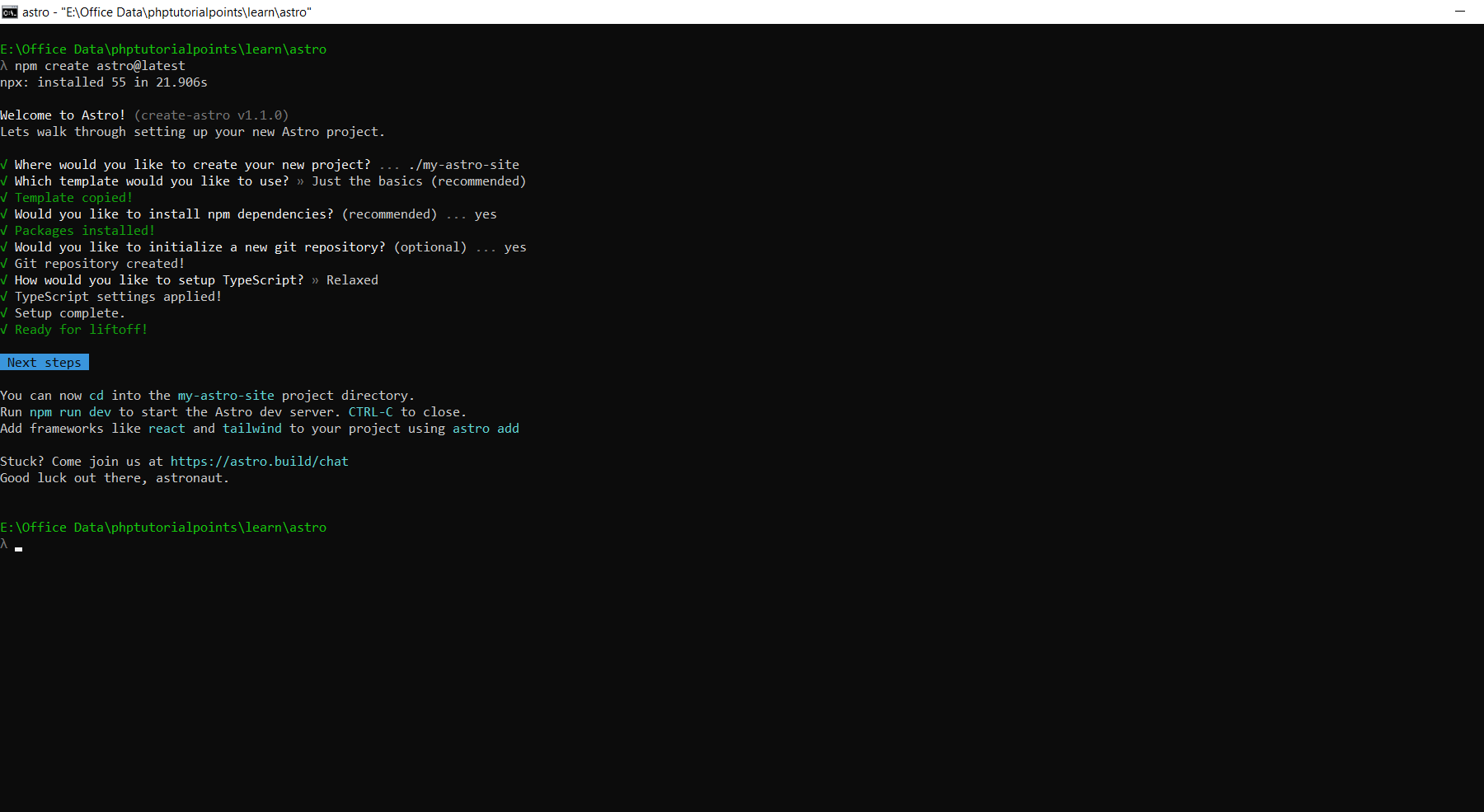
Step 1: First run the “npm create astro@latest” command in your terminal. It will start the installation. it will ask for selection on some points. see the below screenshot. once you select the right choice, installation is completed.
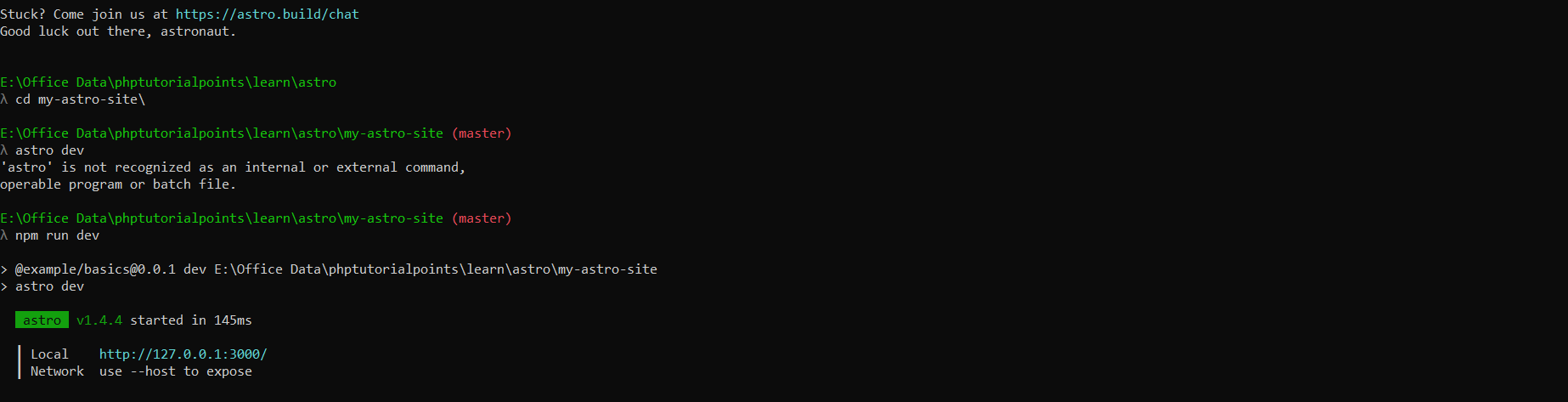
Step 2: Once Astro is installed as per step 1, go to your project directory by running the “cd my-astro-site” command in your terminal. After then, run the “npm run dev” command to run your application. see below screenshot
Step 3: Once you run your project as per the above step, you can now see the sample application by open “http://127.0.0.1:3000/” in your browser. see below screenshot for the output of the sample application
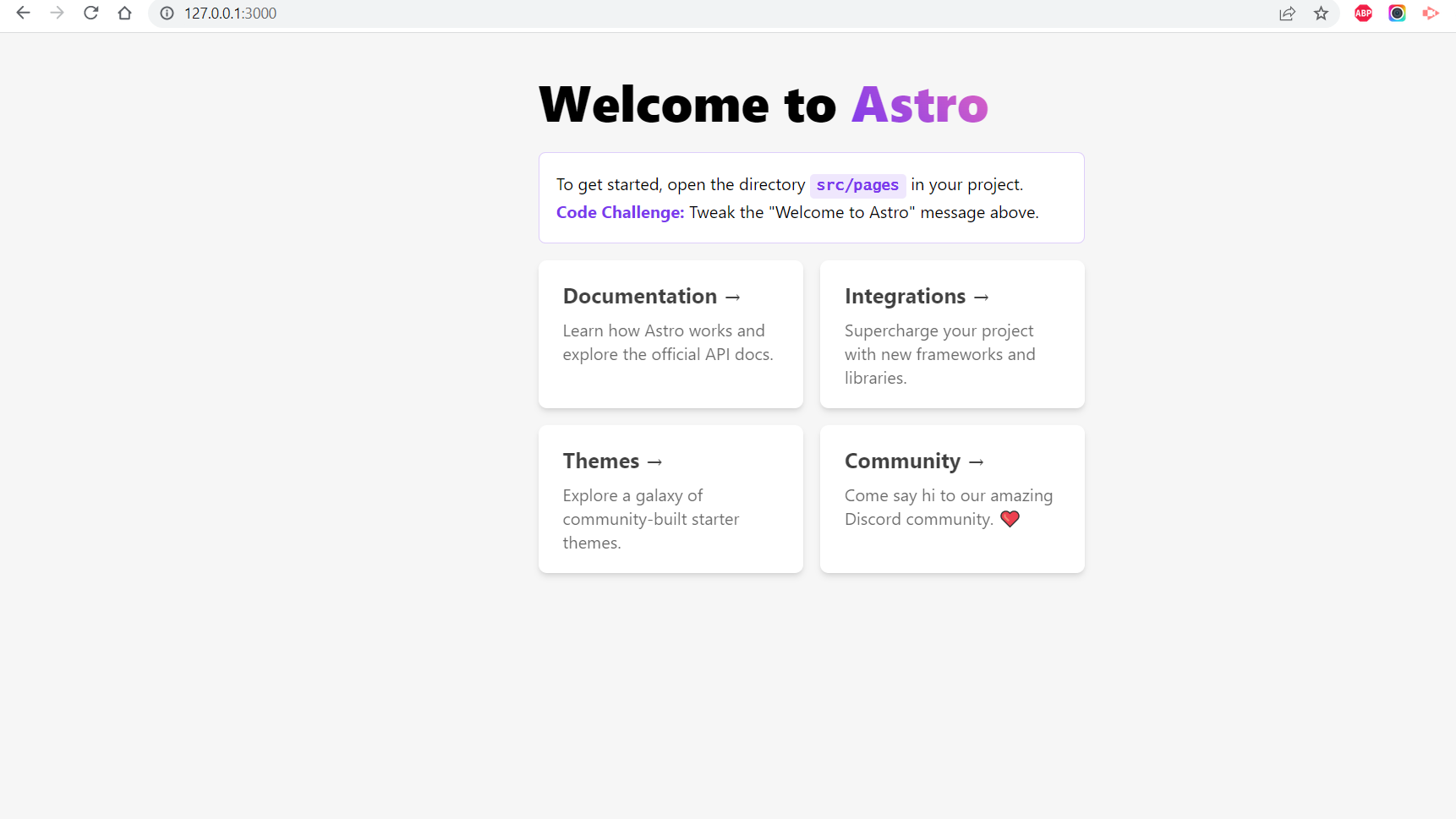
Your sample application is ready!
You can follow the below instruction video for the installation process:
Directory Structure:
Every Astro project includes the following directories and files:
- src/* – Your project source code (components, pages, styles, etc.)
- public/* – Your non-code, unprocessed assets (fonts, icons, etc.)
- package.json – A project manifest.
- astro.config.mjs – An Astro configuration file. (recommended)
- tsconfig.json – A TypeScript configuration file. (recommended)
Advantages and Disadvantages of It:
Advantages:
- It was designed for content-rich websites.
- Websites run faster when they render HTML on the server.
- It should be impossible to build a slow website in It.
- You don’t need to be an expert to build something with It.
- Over 100+ Astro integrations to choose from.
Disadvantages:
- The support for routing and state management has not been mentioned nor does it seem like there is a potential solution.
- lack of tooling and ecosystem
Astro vs Traditional Frameworks
| Feature | Astro | Traditional SPA Frameworks |
|---|---|---|
| JavaScript Load | Minimal | Heavy |
| Performance | Very High | Medium |
| SEO | Excellent | Requires optimization |
| Rendering | Static + SSR | Mostly CSR |
| Flexibility | High | High |
SEO Benefits of It
It is built with SEO in mind:
- Pre-rendered HTML improves indexing
- Faster load times improve rankings
- Reduced JS improves crawlability
- Better Core Web Vitals
Perfect for blogs, business websites, and landing pages.
Best Practices for Astro (2026)
- Use Component Islands wisely
- Avoid unnecessary hydration
- Use MDX for content-heavy pages
- Optimize images with Astro tools
- Use CDN/Edge deployment
- Integrate Tailwind for fast styling
References:
- https://docs.astro.build/
- https://hackernoon.com/an-intro-to-the-astro-framework-benefits-and-drawbacks
Conclusion
It represents the future of modern web development by combining the best aspects of static and dynamic approaches. Its innovative Component Islands architecture, server-first design, and minimal JavaScript philosophy make it one of the fastest frameworks available in 2026.
Whether you’re building a blog, portfolio, or large-scale content platform, it provides the tools and flexibility needed to deliver exceptional performance and user experience.
If performance and SEO matter to your project, it is definitely worth considering.
It opens up exciting possibilities for web developers seeking a middle ground between static and dynamic web development. With its unique approach, It empowers developers to create fast, scalable, and interactive websites.
By combining the advantages of static site generators and dynamic frameworks, It is a game-changer in the web development landscape. So, embrace the future of web development with it, and let your creativity soar to new heights! I hope this article helps!